Manage every session of a course, from booking to billing
HyperCRM is practice management software for physiotherapy clinics. Book each session, write its progress note and bill it, all on the same patient record. Patients book online from your own practice website.

Built for a course of treatment
Your clinic
Treatment rooms, and a course on one record
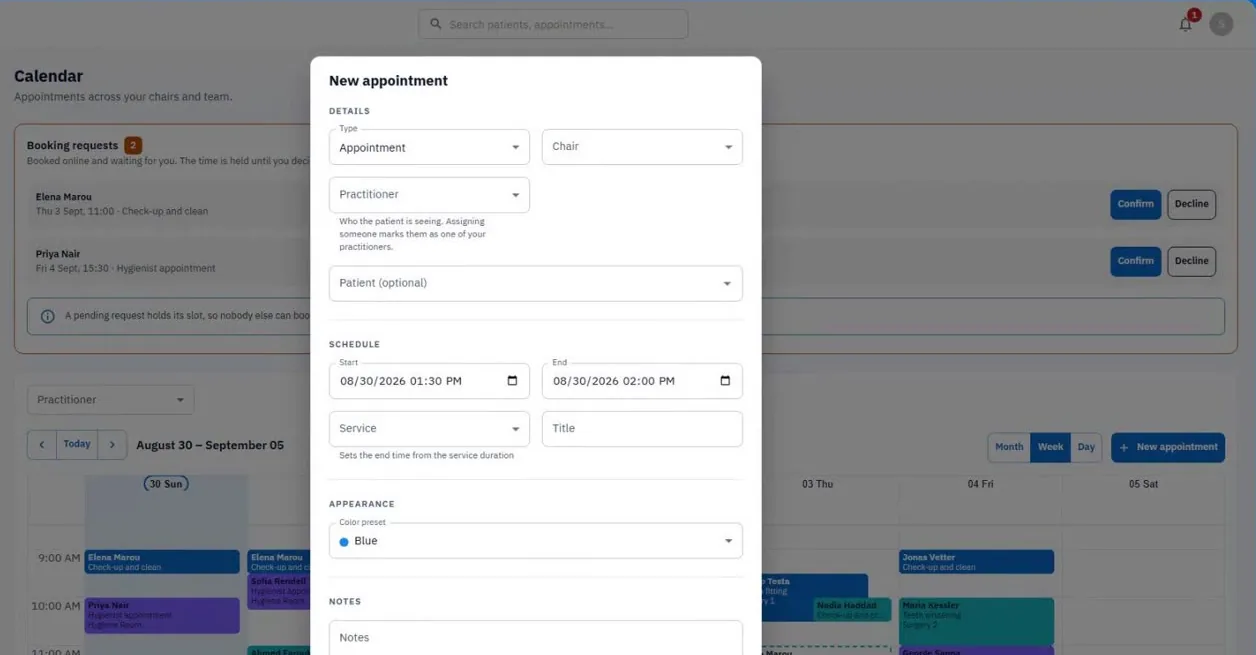
The calendar books patients into treatment rooms, and every session of a course lands on the same record. Progress notes keep their history, so session eleven can be read against session one.
Each course of treatment has its own card: the plan, where it stands, and one line per session
Tag the patients due a review, for example "recall due"

Day to day
Sessions booked, reminded and billed
Patients book online from your practice website, at the times you are free, and a text message or email reminder goes out before each session. Each session is billed from your own service list.
An online request holds its slot until you confirm it
Intake forms signed from a link that expires
Records
Progress notes that hold up later
A course of treatment can be reviewed long after it ends. The last 20 versions of each note are kept, and files sit in private storage only your team can open.
How records are protected
Clear prices. Protected records.
Every price is public
No quote and no sales call. Reception and admin seats are free.
Everyone signs in as themselves
Each person has their own login, with a fingerprint or face login if they want one. There is no shared practice password to leak.
Every change is logged
See who changed something, what they changed and when. The only changes not logged are your practice settings, your HyperCRM plan and each person's own sign-in details.
Common questions
HyperCRM is paid software. Every practice starts with a 30-day free trial of the Complete plan, with no card needed. After that, Essential starts at €19 a month and Complete at €34, VAT included. The price depends on how many practitioners you have. Every price is on the pricing page, so you never need a sales call.
Patient records are encrypted, both where they are stored and on their way to your screen. Files are private, and a link to one stops working after a short time. Changes to patient records are recorded, with who made them and when. There is no shared practice password: everyone has their own account. On the Complete plan, the practice owner can also require two-step sign-in for the whole team.
Yes. The practice owner can export the patient list, the reports and the activity log to a spreadsheet file (CSV) from the app, and anyone in the practice can download its files at any time. Your practice data belongs to you, and there is no export fee or waiting period. That holds on either plan, during the trial, and after you cancel.
A course, yes. Switch on Repeat when you book, choose how often and how many sessions, and HyperCRM books them all, skipping any date that is already taken and telling you which. Each session keeps its own notes, forms and charges on the same record. To keep track of who is due back, tag them, for example "recall due". There is no automatic recall.
Yes. A physiotherapy clinic starts with a ready-made list of services: initial assessment, physiotherapy session, manual therapy, post-operative rehabilitation, clinical Pilates, therapeutic massage, electrotherapy and ultrasound, and a home session, each with a typical price and duration. You might need to change the prices, and add or remove treatments.
Related reading

Holding a waiting list that is actually worth having
Most practice waiting lists are a list of names nobody can act on in ten minutes. What to record, who to call first, and when a waiting list is the wrong tool.
Schedule every session and keep it on one record
Book a session, write the progress note and bill it, in one place. Free trial on Complete, no card, no subscription to cancel.
Start the free trial